photography [27dbffb5]
Tags: personal
1. Videos
1. Videos
3. Aperature
3. Aperature
-
Lower aperature means lower lens open
- f/2.4 - f/8, etc
- Changing aperture changes depth of field
- Shallow depth of field is basically impossible on phone
- Wider aperture means shallower depth of field
- Shallower depth of field means more focus on closer thing
4. ISO
4. ISO
- Higher ISO means higher noise, but allows for faster shutter speed
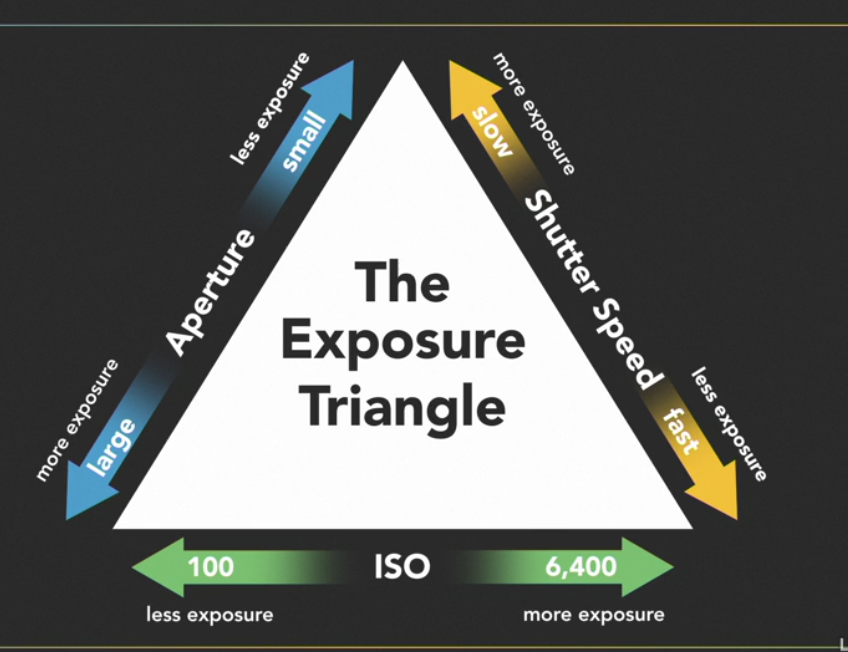
5. Exposure Triangle
5. Exposure Triangle
6. Light Meter
6. Light Meter
- Only works on generalized assumptions
- Databases, facial recongition, etc
7. Depth of Field
7. Depth of Field
- Unlikely to achieve shallow depth of field from smartphone, due to small sensor
-
Has to make changes to ISO
- No aperature changes on phones
- Phone camers don't have a shutter!
- Fast moving objects should be test shotted first!
- ISO range is very different
-
Does have exposure compensation control
- Makes up for the lack of manual overrides
- Shooting in a RAW format lets you use manual exposure
- Biggest diferences is in the actual mechanics of shooting
8. Shooting with a smartphone
8. Shooting with a smartphone
- The flash is usually not needed. Typically switch it off
- HDR feature should be turned off until assured needed
9. Exposure
9. Exposure
- Use most of the frame
- Dynamic range: ratio of darkest to brightest dynamic range
-
Brightness is measured in stops
- Double light -> "1 stop"
- Human eye has ~18 stops
- Further away from the subject reduces the dynamic range
- Pay attention, as the camera moves around, it makes for different decisions
- Tapping for focus and exposure
10. Low Light Shooting
10. Low Light Shooting
-
Flash is unnatural
- Especially for low light
- Make sure elbows at your side
- Don't hold breath (makes you shake more)
-
Wait for screen to go black
- Don't trust the view finder
-
Careful of motion blur, view blurring, and others
- Careful to tell you when the exposure is done
11. Night Mode
11. Night Mode
- Night mode on phones composite large numbers of photos
12. Focal Length
12. Focal Length
- Shooting with different focal length does not mean the image is the same
- Lens changes the background
13. Zooming
13. Zooming
- Don't bother with pinch to zoom
- Take the shop, crop it later
14. Shooting with flash
14. Shooting with flash
- Fill flash -> filling in the shadowy areas with flash to compensate for high light in background
- Flash on phones is not very strong, range is 3-4 ft
15. Orientation
15. Orientation
- Most people shoot in portriat orientation
- Drop to your knees to take a different PoV
16. Aspect Ratio
16. Aspect Ratio
- 4:3 to 16:9
- crop everything out you don't need
- play around with where to put the horizon
17. Black and White Photos
17. Black and White Photos
- Potenially easier, less information
- Stripping out the information density
- The conversion in post-production is a lot easier
-
Gives the option to make the photo simplier
- Look for photos about lines and shape and form
18. Portrait Mode
18. Portrait Mode
-
Computational photography
- Fakes shallow depth of field
- Look for mistakes in the portrait mode filters
- Not compatible with RAW
19. Panorama Mode
19. Panorama Mode
-
Most useful for wider angle in a small space
- Fakes a wide-angle lens
20. Shooting in raw
20. Shooting in raw
- Camera doesn't apply changes
- Raw data from senors
- Adjust white balance
- Sometimes recover overexposed highlights
- Higher bit depth
-
Does not:
- Sharper image
- Greater dynamic range
- Strictly about editing
21. Add on lenses
21. Add on lenses
- Macro lens lets you scale 1:1